


Parental Control App Blocker
4.6496.00 Reviews
App Specs
- Version
- 1.500
- Updated On
- License
- Free
- Downloads
- 5,000,000+
- Developer
- Kid security LLP
- Categories
- Parenting
- Platform
- Android, iOS
Screenshots
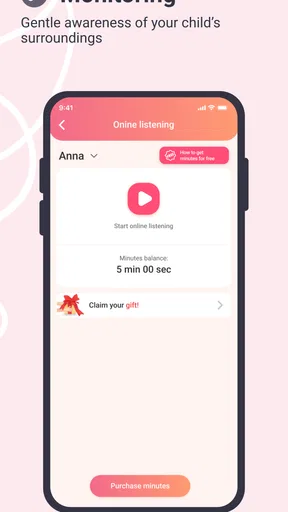
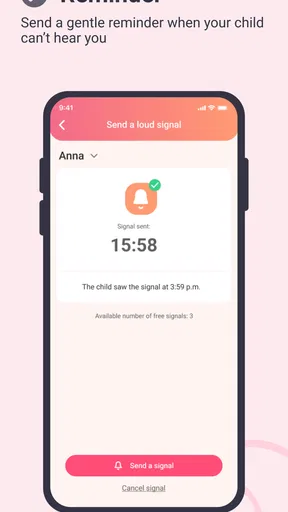
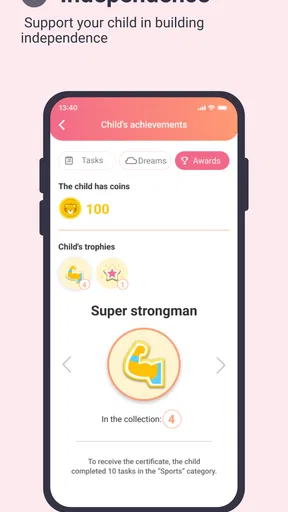
 Analysis by AppCompare
When I consider a parental-control app, I want more than a long list of restrictions. I want to understand what I can actually manage, what the experience asks of a family, and where my own judgement still matters. Parental Control App Blocker is aimed at parents who want practical oversight of children’s device use, but I’d approach it as a tool for setting boundaries together—not as a substitute for conversation or trust.
Trust starts with clear expectations
This is a parenting app from Kid security LLP, and its focus is managing a child’s digital environment. That can be useful, but parental controls touch sensitive parts of family life: device habits, browsing and, in this app’s described feature set, location. I would talk with a child about what is being managed and why before turning controls on. A clear explanation makes limits easier to understand and reduces the risk that monitoring feels like a secret test.
The app is free to install, while in-app purchases range from $1.99 to $399.99 per item. I’d check the purchase choices carefully before committing to anything, and decide as a family what level of oversight is actually needed. Its Everyone age rating describes the app’s audience rating; it doesn’t mean every feature or setting will suit every child.
Controls are useful when they match a routine
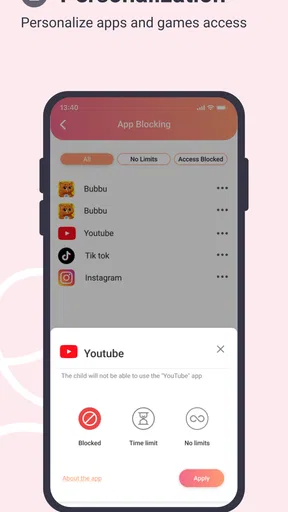
Blocking selected apps, setting screen-time limits and scheduling device use are the most directly practical controls described here. Rather than start by blocking everything that might distract a child, I’d identify one recurring problem—late-night gaming, for example—and use a schedule or limit to address that specific moment. A focused rule is easier to explain and less likely to disrupt useful activities.
App profiles can help when siblings use devices differently. I would review each child’s settings separately instead of copying one profile across the household: a restriction that works for a younger child may be unnecessarily tight for an older one. It’s also worth agreeing on exceptions in advance, such as when a device is needed for homework, so a rule doesn’t become an argument at the least convenient time.
Location and web filtering need a thoughtful approach
Location tracking and web filtering can address different concerns, but they deserve more care than a simple app block. I’d use location information only for a clear family-safety purpose and explain that purpose to the child. For web filtering, I’d treat blocked sites as a starting boundary rather than assume a filter can judge every page perfectly. Talking through an unexpected block is often more useful than treating it as proof that a child did something wrong.
Before relying on any sensitive control, I’d look closely at the app’s permission requests and the choices it presents during setup. The controls described here do not, by themselves, tell me how information is handled or what account-management options are available. I wouldn’t guess about those details; I’d check the app’s own screens and relevant privacy information before enabling monitoring that feels intrusive.
Worth Reading Before You Choose

Baby Panda World Brings Quick Play to Modern Phones, but Its Game Library Feels Busy

ESPN’s Live Game View Makes Following Close Games Easier

QuizzLand Review: A Good Fit for Short Trivia Breaks, Not Every Player

Basketball Stars: Multiplayer Is Fast, but Can It Recover When Matches Go Wrong?

WEBTOON Turns Phone Updates Into a Better Reading Routine

Link to Windows Runs on Shared Habits, Not Social Feeds
Who is likely to get the most from it?
I can see this being most useful to parents who want a straightforward way to set device routines and who are willing to explain those routines. It may be a better fit for a family dealing with repeated screen-time disputes than for someone looking for a completely hands-off solution. The app has a 4.5 average from around 80,000 ratings and has been installed over a million times, which suggests broad interest, but those figures cannot tell you whether its controls will match your household.
For older children and teenagers, I’d involve them in choosing limits and revisit them as schoolwork, activities and independence change. If a teen needs access to particular apps at specific times, a blanket block may create more friction than it solves. A built-in device setting or a simpler screen-time tool may be a better choice if your only goal is a basic usage limit and you don’t need the broader parental-control approach.
What’s the Buzz About Parental Control App Blocker?
First off, the Parental Control App Blocker is like a guardian angel for your child’s phone or tablet. It allows you to monitor and manage your child's app usage seamlessly. It’s super handy for those moments when you're not around but still want to make sure everything is under control.
With this app, you can block certain apps, set time limits, and even schedule when the device can be used. Imagine being able to stop those endless gaming sessions or social media scrolling marathons with just a few taps. Sounds pretty awesome, right?
Setting Up is a Breeze
One of the standout features of the app is its user-friendly setup. Trust me, even if you're not the most tech-savvy person out there, you'll find it pretty straightforward. Just download it from the App Store or Google Play, follow the on-screen instructions, and you’re good to go.
Once installed, you can create different profiles for each child. This is a lifesaver if you've got more than one kid and each has different needs or schedules. You can tailor the settings to suit each little one perfectly.
Features That Make Life Easier
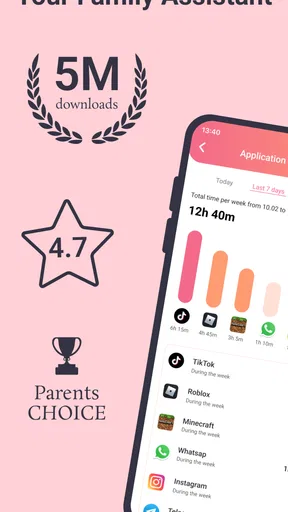
Now, let's talk about the features that make this app a must-have. You can block specific apps that you don’t want your kids to access. Plus, there are options to set daily or weekly screen time limits. This means no more arguments about when to put the tablet down!
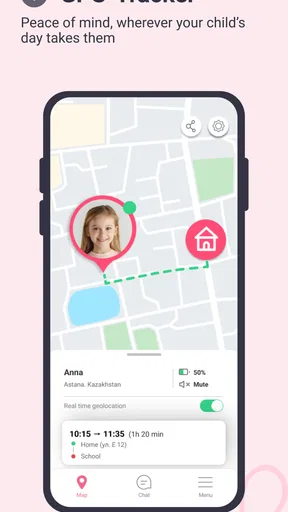
Another feature I found particularly useful is the location tracking. It gives parents an extra layer of security by knowing where their kids are when they’re outside. And if you're worried about inappropriate content, there’s a web filtering option that blocks sites you deem unsuitable.
Making the rules work in everyday life
Picture a school night: a child finishes homework, opens a game, and loses track of time while a parent is busy making dinner. A daily limit or scheduled device window can turn that familiar standoff into a predictable rule. I’d agree on the limit before the device comes out, then check whether it leaves enough room for school tasks and ordinary downtime. The point is to make the routine visible, not to surprise a child with a lockout.
A less obvious practical tip is to test a new schedule on a low-stakes day. If a device is shared for homework or a child’s routine shifts between households, a strict timetable may block legitimate use. Starting with a narrow rule and reviewing how it affects the week gives you a chance to adjust before it becomes a source of daily frustration.
Comparing it with simpler options
Compared with relying only on a device’s built-in screen-time settings, this app brings app blocking, schedules, profiles, location tracking and web filtering into a parental-control-focused experience. That broader scope may be appealing if you want several kinds of oversight in one place. The trade-off is that more control calls for more discussion and careful setup; families that only want a bedtime device limit may find the standard settings already do enough.
It also isn’t a replacement for checking in with a child about what they encounter online. A web filter can help set boundaries, while a conversation helps a child handle material that slips through or is difficult to classify. I’d pair the technical rule with a simple plan for what the child should do if a page feels uncomfortable, rather than treating filtering as complete protection.
Questions worth answering before you rely on it
Will it work on your device? The current version is 1.484, and the minimum operating-system requirement is 7.0. I’d check that the child’s device meets the requirement and test the controls on the actual device you plan to manage. A parent’s phone and a child’s tablet can behave differently, so confirming that a rule takes effect where it matters is a sensible first step.
Does it cost anything? The app is free to install, but optional in-app purchases are listed from $1.99 to $399.99 per item. I’d review the purchase screen and decide what is necessary before entering payment details; the broad price range makes it especially important not to assume every family will need the same option.
Can a parent set it once and forget it? I wouldn’t. Children’s schedules change, and a rule that made sense during a school week may not suit a holiday or a new activity. A brief check-in—whether limits still fit, whether a site was blocked unexpectedly, and whether location monitoring still serves a clear purpose—keeps the controls proportionate.
Why Parents Love It
As a parent, you want to ensure your child’s safety without having to check over their shoulder constantly. That’s where this app shines. It provides a balance between freedom for the child and control for the parent. You get to decide what’s best for your child, and the app helps enforce it.
And let’s not forget the peace of mind it offers. Knowing that your child isn’t accessing anything harmful or spending too much time on screens when they should be doing homework can be a huge relief.
Room for Improvement
Of course, no app is perfect. There are times when the app might feel a bit too restrictive for older kids, especially teenagers who crave a bit more independence. It might take some trial and error to find the perfect balance that works for both you and your child.
Additionally, while the app is intuitive, some users have reported occasional glitches. But hey, what app doesn’t have a hiccup now and then? Regular updates seem to address most issues as they arise.
Checking controls before making them part of family life
I’d also avoid treating a successful setup as proof that every safeguard is working exactly as intended. Try the app block, schedule and web filter yourself, then ask the child to show you what happens when a limit is reached. That small test can uncover confusing rules early, when they are easy to explain and revise.
For families who share a device, profiles deserve particular attention. A profile meant for one child may not be appropriate when a sibling borrows the same tablet, so I’d make clear whose settings apply and when. If that arrangement is too cumbersome to manage, a simpler household rule—such as keeping a shared tablet in a common area—may be more practical than adding layers of controls.
A cautious recommendation
Overall, I see this as a potentially useful option for parents who want more than a basic time limit and are comfortable staying involved in the settings. It is less compelling for families seeking invisible monitoring, a set-and-forget solution, or only a simple bedtime reminder. My recommendation is to begin with one clearly explained boundary, verify how it works, and add other controls only when they serve a specific need.
Final Thoughts
All in all, the Parental Control App Blocker is a solid choice for parents looking to manage their child’s digital life. With its wide array of features and ease of use, it’s an excellent tool to have in your parenting arsenal.
So, if you're looking to bring a little more order to the chaos of managing kids and tech, give this app a try. It just might be the solution you’ve been searching for!
Pros
- User-friendly interface for easy setup.
- Real-time alerts for suspicious activity.
- Customizable screen time limits.
- Blocks inappropriate content effectively.
- Supports multiple devices simultaneously.
Cons
- Requires constant internet connection.
- Limited features on the free version.
- May drain battery quickly on some devices.
- Some apps might bypass restrictions.
- Complex setup for tech-challenged users.
FAQs for Parental Control App Blocker
What features does the Parental Control App Blocker offer?
The Parental Control App Blocker provides comprehensive features including app blocking, screen time management, web content filtering, and real-time location tracking. It allows parents to set daily usage limits, monitor app usage, and receive alerts about potentially harmful activities. The app also supports multiple child profiles, making it versatile for families.
Is the app compatible with both Android and iOS devices?
Yes, the Parental Control App Blocker is compatible with both Android and iOS devices. It supports a wide range of smartphones and tablets, ensuring seamless integration across different platforms. Regular updates ensure compatibility with the latest operating systems, providing a reliable experience for users.
How user-friendly is the Parental Control App Blocker?
The app is designed with user-friendliness in mind, featuring an intuitive interface that makes it easy for parents to navigate and configure settings. The setup process is straightforward, with detailed guides and customer support available. Parents can quickly adjust controls and monitor activities without technical expertise.
Are there any privacy concerns with using the app?
The Parental Control App Blocker places a strong emphasis on privacy and security. All data is encrypted to protect personal information, and the app adheres to strict privacy policies. Parents have complete control over the data collected and can manage settings to ensure their child's privacy is respected.
Is there a cost associated with the Parental Control App Blocker?
The app offers a free version with basic features, but to access the full range of functionalities, a subscription may be required. Subscription plans are flexible, often including monthly and annual options, providing enhanced features like advanced reporting and premium support. Check the app store for current pricing details.


